Beat Maker - Drum Pad Pro
- 4.8
- Rating
- 1.00M
- Installs
- Free
- Price
 Analysis by App-foxy
I tried Beat Maker - Drum Pad Pro with a simple question in mind: could one small music app work well when several people share the same phone or tablet? My answer is yes, as long as everyone treats it as a hands-on sound toy rather than a complete recording studio. It brings beat-making together with playable drum, guitar, and piano sounds, so a child can tap around, a parent can build a quick rhythm, and a more curious beginner can use the same screen to understand how different instruments fit into a track.
That shared-device angle is where this app makes the most sense. It is free, rated for Everyone, and comes from Smart Experiences, which makes it easy to suggest for a household that wants a low-commitment way to explore music. I would not present it as a replacement for a full digital audio workstation, but I would happily keep it available for short creative sessions, especially when someone wants to make noise immediately without first learning a complicated interface.
How Beat Maker - Drum Pad Pro works in a shared household
I find a shared device works best when music-making has a little structure: one person chooses the rhythm, then hands the screen over so someone else can add a different sound or start a fresh idea. That keeps the activity welcoming without turning every turn into a scramble for the controls. It also makes it easier to notice which sounds the group enjoys before deciding whether a more focused music app would suit everyone better.
You May Also Like

 Blood Strike: 2.5 Anniversary
Blood Strike’s Loadouts Turn Every Drop Into a Tactical Gamble
A close look at Blood Strike’s custom loadouts: how fast access to signature weapons reshapes its battle royale rhythm, rewards preparation, and narrows the gap between fights.

 Pandora - Music & Podcasts
Pandora’s Music Is Easy to Start, but Harder to Recover
Pandora’s strength is its low-effort path from a seed to a station. Its weak spot is how much confidence it asks you to place in connection, setup, and quiet recovery.

 8 Ball Pool
 Is Built on Rivalries, Rematches, and Routine
A close look at the rivalries, rematches, shared routines, and unanswered safety questions that turn a quick pool match into a persistent mobile community.

 Samsung Music
’s Quiet Strength Is Playing What You Already Own
Its reach comes less from spectacle than from dependable access to a personal library. That simplicity is both the app’s strongest retention engine and its ceiling.

 AccuWeather: Weather Radar
AccuWeather Review: A Quick, Clear Forecast for Everyday Decisions
For everyday plans, the best forecast is the one you can understand quickly. AccuWeather makes rain timing, radar, and local conditions easy to act on, with a few trade-offs.

 Hill Climb Racing
Why Hill Climb Racing Still Turns Crashes Into One More Run
A tiny car, a bumpy hill and one more upgrade: Hill Climb Racing keeps resurfacing because its simple chaos makes every near-miss feel personal.
More From Our News Desk
View All News


A quick activity for different skill levels
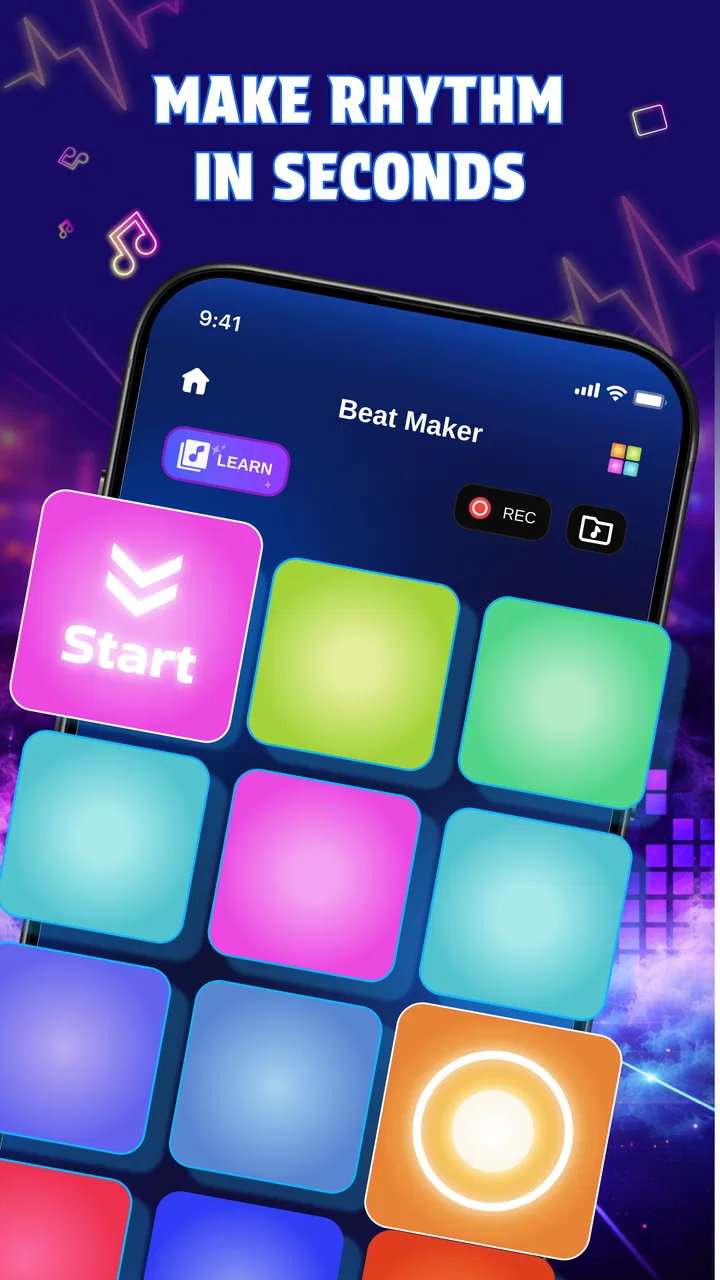
The core appeal is immediate interaction. Instead of beginning with long menus, theory lessons, or a large project screen, the app puts attention on tapping and listening. That makes it suitable for a casual moment when one person starts a rhythm and another person wants to add something. The combination of a beat maker with drum, guitar, and piano play gives the experience more range than a simple drum-pad app, while still keeping the basic idea approachable.
I can imagine using it at home after dinner: one person taps out a steady pulse, another experiments with percussion, and someone else tries the melodic instruments. The activity does not require everyone to understand musical notation. The useful part is that the app creates a shared object of attention. People can take turns, copy a pattern, or deliberately change the mood by switching from a percussive sound to a more melodic one.
That does not mean it is automatically ideal for uninterrupted group play. On a single device, only one person has direct control at a time. Younger users may also tap faster than the person trying to keep a rhythm, and a shared session can become noisy quickly. I found the best approach was to give each person a short turn or assign a simple role: one person keeps the beat, one adds accents, and one explores the other instruments.
Why the three instrument choices matter
The drum, guitar, and piano options are more than decorative variety. They encourage different kinds of listening. Drums are the easiest place to begin because a tap produces an obvious rhythmic response. Piano is useful for someone who wants to explore pitch and melody. Guitar adds another familiar musical color, even for a user who has never held a real instrument.
A practical tip is to avoid changing instruments constantly during the first session. I would begin with drums, establish a repeating pulse, and then let the next player add piano or guitar. This makes the difference between rhythm and melody easier to hear. It also gives children a small sense of coordination without turning the experience into a formal lesson.
The limitation is that this kind of compact interface cannot offer the depth of a dedicated instrument-learning app. Someone looking for finger placement, structured exercises, detailed sound shaping, or a serious practice routine will probably outgrow it. Its strength is the first five minutes of curiosity, not a complete path toward musicianship.
Setting expectations before handing over the device
Because the app is so accessible, I would explain the boundaries before giving it to a child or passing it around a room. It is an app for making and playing sounds, not a replacement for a real keyboard, guitar, drum kit, or professional production setup. That small explanation prevents disappointment and helps users focus on experimentation instead of searching for advanced studio controls.
The age rating of Everyone makes it a comfortable choice for mixed-age use, but an age label does not solve every household issue. A young child may need help understanding how to move between the beat-making area and the instrument choices. A parent may also want to decide when sound is appropriate, particularly if the phone is being used in a quiet room or shared space.
I would also set a simple turn-taking rule on a family device. Let one person create a short idea, then invite the next person to modify it or start fresh. This avoids the common problem where the most confident user controls the entire session. The app works best when the device becomes a shared sketchbook rather than a competition for the screen.
Coordination without overcomplicating the experience
Beat Maker - Drum Pad Pro is especially useful for informal coordination because it gives everyone a common sound vocabulary. You do not need to say “play the third note” or explain a complicated timeline. You can say, “keep this pulse,” “add something between those taps,” or “try the piano over the rhythm.” Those instructions are concrete enough for beginners and still leave room for personal choices.
One technique I liked was using contrast instead of trying to create a perfect song. Ask one player to make a calm pattern and another to make a busy one. Then compare how the instrument choices change the feeling. This turns a short session into a listening exercise and helps users notice that a beat is not only about speed. It is also about space, repetition, and the relationship between sounds.
Another useful household workflow is to separate exploration from performance. During exploration, users can tap freely and switch between drums, guitar, and piano. During performance, everyone agrees on a short arrangement and avoids changing roles halfway through. That distinction reduces frustration, especially for children who want to experiment while another person is trying to maintain a recognizable pattern.
There is a trade-off here. A shared device makes collaboration immediate, but it also means the experience depends on physical handoffs and attention spans. If your goal is remote collaboration, separate practice, or a project that several people can edit independently, a more specialized music platform will be a better fit. This app is strongest when the participants are in the same place and want a quick, low-pressure activity.
Account boundaries and responsible shared use
For a household, I would treat this as a device-level activity rather than a service that needs to become part of everyone’s personal account routine. That keeps the social boundary simple: the app is available on the shared phone or tablet, and each person uses it during an agreed session. I would not assume that one person’s musical experiments belong to another person, or that a child should be given unrestricted access to every app on a shared device simply because this one is suitable for Everyone.
The sensible setup is to use the device’s existing household rules for screen time, volume, and turn-taking. Those rules should come from the family’s normal device arrangements rather than from expectations that this music app will manage them. I also prefer to explain that tapping is the activity itself; there is no need to press every control just to see what happens. That guidance protects the device from careless handling and helps younger users stay focused.
For adults sharing a phone, the main boundary is practical rather than technical. One user may want a quiet beat-making break while another needs the device for messages or navigation. I would keep sessions short and avoid treating the app as a background activity when the phone is needed for something more important. On a tablet kept in a common room, the app feels more naturally shared because the screen is easier for several people to see.
Age, trust, and the right kind of independence
The Everyone rating makes the app approachable for children, but I would still match independence to the child rather than relying on the label alone. A child who can already use a touch-screen instrument can probably explore the basic idea without much instruction. A younger child may benefit from an adult sitting nearby for the first session, not because the musical concept is difficult, but because shared devices often contain other activities and settings that need separate household supervision.
What I like here is that the musical task itself can be trusted to remain simple. A child can learn through immediate cause and effect: tap something, hear a sound, change the timing, and listen again. That is a healthier starting point than making a young user feel that every mistake is permanent. I would encourage experimentation, while also teaching the difference between creative noise and a pattern that other people can follow.
Parents should also consider the social side of trust. If several children use the same device, agree on whether they may change one another’s work or whether each person gets a separate turn. Even a small music app can create arguments when one child believes another has ruined an idea. A clear rule such as “you may remix during your turn, but do not interrupt someone else’s turn” makes the activity more cooperative.
For older children and adults, the app can serve as a gateway. Someone who enjoys building a beat here may later want a sequencer, multitrack recording, or a proper instrument. That is a positive limitation: the app can reveal an interest without demanding a serious commitment at the beginning. I would only skip it for a user who already knows they need detailed editing, precise production tools, or a large sound library.
What the current release feels like in practice
The current version is 1.0.0, so I approached it as a straightforward starting point rather than a mature production environment. That matters when deciding how much responsibility to place on it. For quick play and discovery, a focused first release can be an advantage because there is less to learn. For long-term projects, I would be more comfortable with an app designed specifically around saving, arranging, and refining music.
The app was released on February 13, 2026, and it supports Android 7.0 or later. That broad system requirement makes it practical for households that keep an older phone or tablet for shared activities. I would still check the device’s general condition before relying on it for group use: an aging screen, weak speaker, or inconsistent touch response can make rhythm play feel harder than it should.
Its reception is encouraging, with a 4.9 average from around 154 ratings and over 50 thousand installs. I see those figures as a sign that the simple concept is connecting with early users, not as proof that it will satisfy every musician. A small music app can be enjoyable precisely because it avoids complexity, and that same simplicity can disappoint someone expecting studio-level control.
How it compares with common alternatives
Compared with a dedicated drum-pad app, this one has a broader household appeal because it includes guitar and piano play as well. A drum-only tool may be preferable for someone focused entirely on beat performance, especially if that app offers deeper pad customization or more detailed timing controls. For a family, though, the instrument variety gives more people a reason to take a turn.
Compared with a full digital audio workstation, Beat Maker - Drum Pad Pro is much easier to approach but far less suitable for serious arrangement. A workstation is the better choice when you need multiple tracks, careful editing, recording, mixing, or a project that develops over days. I would choose this app when the goal is to start making sounds immediately, not when the goal is to finish a polished release.
It also differs from instrument-learning software. A lesson-based piano or guitar app usually emphasizes technique, progression, and practice structure. This app is more open-ended. That makes it less demanding and more playful, but it also means the user must create their own reason to return. If your child wants guided learning, choose a teaching app. If they want to explore what a beat and a few instruments can do together, this is a better match.
Who should use it and who should move on
I recommend it to beginners, families with a shared tablet, casual creators, and anyone who wants a quick musical distraction without paying for a larger production suite. It is also a good conversation starter for adults who want to show a child the difference between rhythm and melody. The free price removes the biggest barrier to trying it, and the Everyone rating suits a mixed-age environment.
I would skip it if you need professional recording, advanced composition, a structured curriculum, or independent profiles for several users. I would also avoid making it the main tool for a band or a serious songwriting project. The app can help generate an idea, but users who need to preserve, edit, and develop that idea in detail should move to a more specialized solution.
My most practical recommendation is to use it in short sessions with a clear purpose. Spend one turn building a rhythm, one turn adding a melodic response, and one turn changing the arrangement. That approach gets more from the drum, guitar, and piano choices than random tapping does, while keeping the activity light enough for a shared household.
My household verdict
Beat Maker - Drum Pad Pro is a friendly musical sketchpad for shared moments. I like it because it lowers the barrier between “I wonder what this sounds like” and actually making a beat. The app’s best quality is not depth; it is the way it lets different ages and skill levels participate in the same small activity.
Smart Experiences has kept the idea clear: tap, listen, switch instruments, and try again. That clarity is valuable on a family device, where nobody wants to spend the first session explaining a complicated production workflow. The honest compromise is that the app’s simplicity limits how far a serious musician can take a project.
For my own recommendation, I would install it on a shared tablet, agree on turns, keep the volume considerate, and use it as a creative break rather than a substitute for formal music practice. At no cost, it is an easy app to try, and its early reception suggests that the basic experience is landing well. If your household wants a low-pressure way to explore beats together, this is worth a place on the device; if you need finished songs or detailed control, choose a dedicated music-making tool instead.
FAQs for Beat Maker - Drum Pad Pro
01What features does Beat Maker - Drum Pad Pro offer?
Beat Maker - Drum Pad Pro provides a comprehensive set of features for music creation. Users can access a variety of sound packs, custom drum pads, and professional-grade audio effects. The app supports live recording and has a user-friendly interface, making it suitable for both beginners and experienced producers.
02Is Beat Maker - Drum Pad Pro suitable for beginners?
Yes, Beat Maker - Drum Pad Pro is designed to be accessible for beginners. It offers tutorials and a straightforward interface to help new users create beats easily. The app also includes pre-made sound packs and patterns, allowing beginners to experiment and learn without needing advanced knowledge of music production.
03Are there any in-app purchases or subscriptions in Beat Maker - Drum Pad Pro?
While Beat Maker - Drum Pad Pro is free to download, it offers in-app purchases and subscription options. These purchases provide access to additional sound packs, premium features, and an ad-free experience. Users can choose to subscribe monthly or annually, depending on their needs and budget.
04Can I export my creations from Beat Maker - Drum Pad Pro?
Yes, Beat Maker - Drum Pad Pro allows you to export your music creations. You can save your beats in various formats such as MP3 or WAV, making it easy to share with others or use in other music projects. This feature is essential for musicians looking to distribute their work.
05What devices are compatible with Beat Maker - Drum Pad Pro?
Beat Maker - Drum Pad Pro is available for both Android and iOS devices. It supports a wide range of smartphones and tablets, ensuring that users can create music on the go. For optimal performance, it is recommended to have a device running the latest operating system and with sufficient storage space.
Pros
- Intuitive interface for easy beat creation.
- Wide range of sound packs available.
- Real-time audio effects enhance creativity.
- Customizable pads for personalized setup.
- Supports MIDI for advanced users.
Cons
- Limited free features without subscription.
- Occasional lag on older devices.
- Ads can be intrusive in free version.
- Requires significant storage space.
- No option for exporting to all formats.

Beat Maker - Drum Pad Pro
Gallery